
Muppfråga: KTMs digitala display...

-PLM-

Snabbast i stan!
Gick med
6 Sep 2003
Ort
Tokholm
Hoj
KTM 525 EXC -06, GSXR1000 -07
Hur fan får man den att visa maxfart? När den startar ser man alla symboler tändas, där finns max med. Men när jag bläddrar i menyerna får jag bara fram en massa blaj, 2olika medelhastigheter osv, men inte maxfarten?
Vill ju veta hur otroligt snabb jag e...
 
-PLM- skrev:
Hur fan får man den att visa maxfart? När den startar ser man alla symboler tändas, där finns max med. Men när jag bläddrar i menyerna får jag bara fram en massa blaj, 2olika medelhastigheter osv, men inte maxfarten?
Vill ju veta hur otroligt snabb jag e...
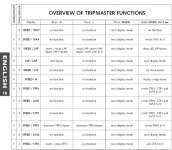
Kanske inte någon hjälp med det här va de jag hittade! 2003 660

Electronic speedometer
The electronic speedometer display is activated as soon as the engine is
switched on and the motorcycle starts to move.
The engine must be started in order for the speedometer to be supplied
with electricity from the generator. The display is not activated until the
front wheel has made 1 revolution (impulse for speedometer).
TEST
All of the display elements will light up for 1 second for the function test.
WS (wheel size)
The display will change and briefly show the diameter of the front wheel in
millimeters.
If the front wheel does not turn, the display will automatically change to the
SPEED/H mode.
If the front wheel turns, the display will automatically change to the SPEED
/ODO mode.
SPEED/H (hours) display mode
When you stop driving and no impulses are sent from the wheel sensor, the
display mode will automatically change from SPEED/ODO to SPEED/H. H
shows the operating hours. The operating hour counter starts to count as
soon as you start the engine. The displayed figure cannot be cleared.
Service intervals are indicated in operating hours for some KTM offroad
motorcycles, making the operating hour counter a very practical function.
SPEED/ODO display mode
The SPEED/ODO mode shows the speed and the total kilometers traveled.
When the front wheel stops turning, the display will automatically change
to the SPEED/H mode.
The information will disappear in the display when the front wheel stops
turning for minute.
ENGLISH
7
Tripmaster switch
The switch has 3 buttons: MODE, + (plus) and – (minus).
The switch can also be mounted on the outer end of the handlebar with a
clamp (SP.NO. 583.14.069.350).
 WARNING 
DO NOT TRY TO CHANGE THE MODE OR READ THE SETTINGS WHILE DRIVING. YOUR
ATTENTION WILL BE DISTRACTED FROM THE TRAFFIC WHICH CAN EASILY LEAD TO AN
ACCIDENT.
Electronic speedometer functions provided by the Tripmaster
switch
The display modes on the electronic speedometer will change in the
following order. If not, please read the chapter "ACTIVATING AND
DEACTIVATING THE DISPLAY MODE."
SPEED/ODO display mode
SPEED displays the speed in KPH or MPH. The displayed figure cannot be
cleared.
ODO displays the kilometers or miles traveled. The displayed figure cannot
be cleared.
+ BUTTON no function
– BUTTON no function
press the MODE BUTTON to change to the next mode
press and hold the MODE BUTTON 3 SECONDS to change to the next mode
SPEED/MAX display mode
MAX displays the maximum speed. It is always active.
+ BUTTON no function
– BUTTON no function
press the MODE BUTTON to change to the next mode
press and hold the MODE BUTTON 3 SECONDS to reset the MAX figure to 0
SPEED/LAP display mode
LAP displays the stopped lap time in hours, minutes and seconds.
+ BUTTON Starts and stops the stop watch. The lap time is not reset to 0.
– BUTTON Stops the running stop watch, stores the lap time and restarts
the stop watch. The time is reset to 0. A total of 10 lap times
can be stored and read in the SPEED/LAP display mode. To
clear all of the stored lap times, hold the MODE button for 3
seconds in the SPEED/LAP mode.
press the MODE BUTTON to change to the next mode
If no lap time is stored or the motorcycle is driving, the LAP/LAP
mode will be skipped.
press and hold the MODE BUTTON 3 SECONDS to reset the LAP figure and all
stored lap times to 0
LAP/LAP display mode
The lap number is shown at the top and the lap time in hours, minutes and
seconds at the bottom of the display.
If no lap time is stored or the motorcycle is driving, the LAP/LAP mode will
be skipped.
Hold the MODE button for 3 seconds in the SPEED/LAP mode to clear the
stored lap times.
+ BUTTON changes to the next lap time.
– BUTTON no function
press the MODE BUTTON to change to the next mode
press and hold the MODE BUTTON 3 SECONDS to change to the next mode
MODE

+
8
SPEED/CLK (clock) display mode
CLK will display time in hours, minutes and seconds.
+ BUTTON no function
– BUTTON no function
press the MODE BUTTON to change to the next mode.
press and hold the MODE BUTTON 3 SECONDS to set the time in the menu
(see SETTING THE CLOCK)
SPEED/H (hours) display mode
When you stop driving and no impulses are sent from the wheel sensor, the
display mode will automatically change from SPEED/ODO to SPEED/H. H
shows the operating hours. The operating hour counter starts to count as
soon as you start the engine. The displayed figure cannot be cleared.
Service intervals are indicated in operating hours for some KTM offroad
motorcycles, making the operating hour counter a very practical function.
+ BUTTON no function
– BUTTON no function
press the MODE BUTTON to change to the next mode
press and hold the MODE BUTTON 3 SECONDS to change to the SETUP mode
(see REVEALING/CONCEALING functions).
SPEED/TRP1 (trip 1) display mode
The TRP1 trip meter is always active and counts to 999.9. It is used to
measure the length of a trip or the distance between 2 refueling stops.
TRP1 is linked to AVS1 and STP1. The calculation of these figures is
activated by the first impulse received from the wheel sensor (when the
front wheel starts to turn) and stops 3 seconds after the last impulse is
received (when the front wheel has stopped).
The TRP1, AVS1 and STP1 figures are automatically reset to 0 after passing
999.9.
+ BUTTON no function
– BUTTON no function
press the MODE BUTTON to change to the next mode.
press and hold the MODE BUTTON 3 SECONDS to automatically reset the
TRP1, AVS1 and STP1 figures to 0.
SPEED/AVS1 (average speed 1) display mode
AVS1 is always active and shows the average speed based on the TRP1 and
STP1 figures. The calculation of this figure is activated by the first impulse
received from the wheel sensor and stops 3 seconds after the last impulse is
received.
+ BUTTON no function
– BUTTON no function
press the MODE BUTTON to change to the next mode
press and hold the MODE BUTTON 3 SECONDS to reset the TRP1, AVS1 and
STP1 figures to 0.
SPEED/STP1 (stop 1) display mode
STP1 shows the traveling time based on TRP1 and continues to count
whenever it receives impulses from the wheel sensor. The calculation of this
figure is activated by the first impulse received from the wheel sensor and
stops 3 seconds after the last impulse is received.
+ BUTTON no function
– BUTTON no function
press the MODE BUTTON to change to the next mode
press and hold the MODE BUTTON 3 SECONDS to reset the TRP1, AVS1 and
figures to 0.
ENGLISH
9
SPEED/TRP2 (trip 2) display mode
The TRP2 trip meter is always active and counts to 999.9. Contrary to
TRP1, the displayed figure can be changed using the + and – buttons. This
is a very useful function for trips taken according to a roadbook.
TRP2 is activated by the first impulse received from the wheel sensor and
stops automatically 3 seconds after the last impulse is received.
+ BUTTON increases the TRP2 figure
– BUTTON decreases the TRP2 figure
press the MODE BUTTON to change to the next mode
press and hold the MODE BUTTON 3 SECONDS to reset TRP2 to 0
SPEED/AVS2 (average speed 2) display mode
AVS2 shows the average speed based on the TRP2 and STP2 figures. The
calculation of this figure is activated by the first impulse received from the
wheel sensor and stops 3 seconds after the last impulse is received.
The displayed figure will deviate from the actual average speed if TRP2 was
changed manually or if STP2 was not stopped after the trip.
+ BUTTON no function
– BUTTON no function
press the MODE BUTTON to change to the next mode
press and hold the MODE BUTTON 3 SECONDS to change to the next mode
SPEED/STP2 (stop 2) display mode
STP2 is a manual stop watch. Start the stop watch by pressing the + button,
press again to hold. Press again to continue timing.
Press the MODE button to change to the next mode. The STP2 display will
blink in the other modes if STP2 continues to run in the background. To
stop STP2, return to the SPEED/STP2 mode and press the + button.
+ BUTTON starts and stops the stop watch
– BUTTON no function
press the MODE BUTTON to change to the next mode
press and hold the MODE BUTTON 3 SECONDS to reset STP2 figures to 0
 

Bifogat

  • speedo.JPG
    speedo.JPG
    98.2 KB · Visningar: 81
Last edited:
Oki, undrar hur mycket klokare jag blev :lol :lol
Nån som vet hur exakt mätaren är? Jämfört med tex japsmoppar?
 
Bläddra fram timmätaren i menyn.Håll in mittknappen några sekunder så kommer du in i menyn.Nu kan du bläddra dig fran mellan alla funktioner med mittknappen,och ta bort och lägga till med dom andra två.Mätaren visar nog ganska rätt om hjulomkretsen är rätt inställd.
 
Skitenkelt. Tryck på knappen tills du kommer till total antal timmar. Där håller du inne knappen som sitter för sig själv. Då börjar ebn jävla massa att blinka och du styr med de andra 2 knapparna vad du vill skall synas i displayen. Där blir det lite stökigt men det är bara att trycka och prova sig fram.

/Kenta
 
Har fått det och funka, men fan vad pillrigt det var att välja vad som ska visas. Fortfarande inte fattat riktigt tror jag :lol
Nu har jag mera problem (såklart). Tripp, max, klocka osv nollställs varje gång. Varför?? ODO och timräknare nollställs inte.
 
*/ ?>
Back
Top